Next-gen Apple OS
iOS 17 is a free development package for users of various Apple devices. As the next generation of its flagship operating system, it introduces a host of new features that make life a lot better for millions of iOS users worldwide. Some improvements include a better autocorrect AI, a Check In feature, and setting multiple timers.
Top Recommended Alternative

Of course, as the platform moves forward, so does the support for iOS 17. Older devices won’t be able to enjoy this free firmware upgrade. However, its release doesn’t immediately terminate support for older OS, like iOS15 Beta or the more recent iOS 16.
Enjoy new levels of personalization
As the newest Apple operating system iOS 17 no longer supports older Apple devices. For example, smartphones released before the iPhone XR and XS won’t be able to get this OS and its features. Also, the first-generation iPhone SE is excluded from this free upgrade. As of its public beta phase, not all supported devices were able to install the new system, although this should be fixed in the following patches.
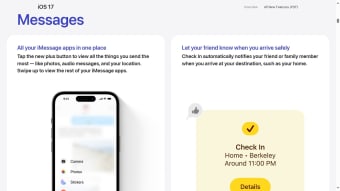
In terms of features, testers reported a significantly smarter autocorrect. It can now remember that certain words were typed intentionally, skipping the bot’s previous tendencies to replace certain terms. A more significant improvement is the ability to set multiple timers to run simultaneously. Also, the new Check-In feature automatically notifies your selected users once you’ve arrived at a predetermined location, such as your home or your office.
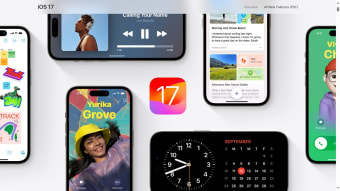
Another cool improvement is the addition of a new StandBy Mode. When you flip your phone into landscape mode while charging, its display changes to include a clock and a calendar of your choice. By default, it features red text against a black background, making it less intrusive when viewed in the dark, like during bedside situations. Voicemails also now come with real-time transcription, making them more accessible.
Interactive widgets and custom home screen
One of the biggest additions after the initial release was the expansion of interactive widgets. Users can now interact with certain apps directly from the Home Screen or Lock Screen without fully opening them. This includes actions like checking off reminders, controlling smart home devices, and managing media playback. The update makes iOS 17 feel more dynamic and customizable, giving users faster access to everyday actions.
Apple also refined Lock Screen customization by improving wallpaper handling, font options, and widget placement. Combined with StandBy Mode, these changes push iOS 17 further toward a more personalized experience across different situations, whether the phone is in hand, locked, or charging on a desk.
Smarter messaging and communication features
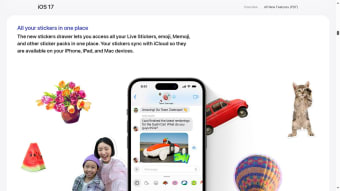
The Messages app received several quality-of-life upgrades that make conversations smoother and more flexible. New additions include audio message transcription, improved sticker support, location sharing enhancements, and faster access to frequently used iMessage apps. Search functionality was also improved, making it easier to find specific messages, links, or photos in long conversations.
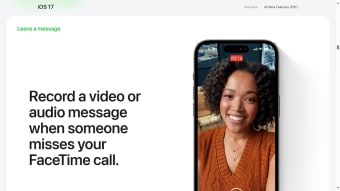
FaceTime gained notable upgrades as well. Users can now leave video or audio messages when calls go unanswered, and reactions such as hearts, balloons, and fireworks can appear automatically during calls using gestures. These additions make communication feel more expressive and interactive across Apple devices.
Journal app and mental wellness tools
A major feature introduced in later iOS 17 updates was the new Journal app, designed to help users reflect on daily experiences and build journaling habits. The app can suggest moments to write about using photos, locations, workouts, and other on-device activity. This focus on personal reflection and digital well-being adds a more thoughtful dimension to the operating system beyond productivity and entertainment.
Apple also continued expanding health and wellness features, including improvements to mood tracking, screen distance notifications for eye health, and enhanced accessibility tools for users with cognitive or visual needs.
Security, privacy, and accessibility improvements
iOS 17 continues Apple’s strong emphasis on privacy and device security. Features like on-device processing for sensitive data, expanded app permission controls, and improved tracking protections help users maintain greater control over their information. The Check In feature was also updated with stronger safeguards so that shared location and travel details are encrypted and automatically deleted after a session ends.
Accessibility saw meaningful enhancements too. New tools such as Personal Voice and Live Speech help users with speech-related conditions communicate more naturally by generating a synthesized voice based on their own recordings. These updates reinforce Apple’s ongoing push to make its devices more inclusive and easier to use for a wider range of people.
A polished evolution
Rather than completely reinventing the iPhone experience, iOS 17 focuses on refining and modernizing the features people use every day. Its strongest improvements are the small but meaningful enhancements to communication, personalization, multitasking, and accessibility. For users with supported devices, the update delivers a more polished and convenient ecosystem that feels smarter, more responsive, and more connected across Apple products.
A must-have for supported devices
Provided you have one of its supported devices, there’s no reason to skip getting iOS 17 on your device. It has many features that improve your experience, from messaging and voicemails to how it appears when charging. Its Check-In feature is perfect for families who need to track loved ones. Aside from the initial features included in its release, expect more features to come with future updates.